| 3. NFS - Network File System | ||
|---|---|---|
 | Chapter 6. Network Operating Systems |  |
| 3. NFS - Network File System | ||
|---|---|---|
| | Chapter 6. Network Operating Systems | |
The Network File System
NFS allows to access files on remote hosts in exactly the same way as a user would access any local files.
Advantages:
Data accessed by all users can be kept on a central host, with clients mounting this directory at boot time.
Data consuming large amounts of disk space may be kept on a single host.
Administrative data may be kept on a single host.
Architecture:
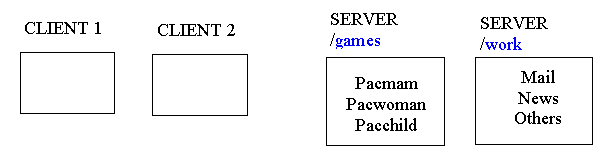
A collection of clients and servers can share a file system.
A machine can be at the same time a NFS client and a NFS server.
A server makes a directory available to clients by exporting it.
Clients can access remote file system by mounting then through a NFS.
A diskless client can mount a remote file system as its root directory, making a completely remote file system.
NFS was invented by Sun Microsystems and adopted by all other Unix vendors.
NFS is the most important networking service using RPCs.
Mounting directories:
A client can mount the directories and files from the file server anywhere in its file system, and use then in the same way as local files.
mount -t nfs oca:/games /games
File Sharing
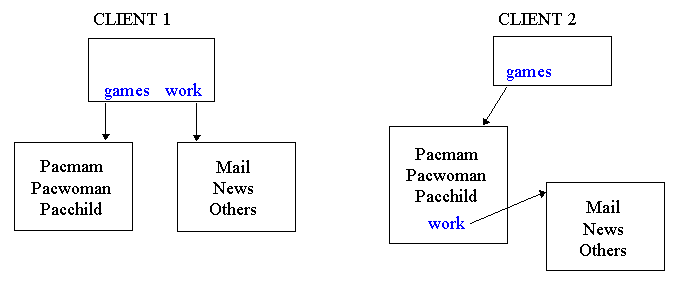
Two or more clients can mount and share the same files from the file server. They can even mount then in different places:
Client 1:
mount -t nfs oca:/games /games
mount -t nfs oca:/work /work
Client 2:
mount -t nfs oca:/games /games
mount -t nfs oca:/work /games/work
NFS Daemons
To provide NFS service to other hosts, you have to run the RPC-based daemons:
nfsd - Provide the file services.
mountd - Provides the mounting services.
NFS Protocols:
NFS uses two protocols:
For mounting (using mountd).
For accessing directories and files (using nfsd).
Mounting directories:
A client may request to mount a directory from a remote host on a local directory just the same way it can mount a physical device:
mount -t nfs oca:/home/tcl /users
mount will then try to connect to the mountd mount daemon on oca via RPC.
The server will check if vale is permitted to mount the directory in question, and if so, return it a file handle.
This file handle will be used in all subsequent requests to files below /users.
The file handle holds:
The file system type.
The directory disk.
The directory i-node.
Security information.
Directories are generally mounted during boot time using the /etc/rc script.
Accessing files and directories
When a file is accessed over NFS, the kernel places an RPC call to nfsd daemon on the server machine.
Commands to change directory entries:
read.
write.
access attributes:
mode
size
time of last modification
Commands to change files:
lookup
Client sends file name and gets file handle.
read
To get the data, the client sends:
File handle.
Offset to read point.
Number of bytes.
write
Similar to read.
Note:
The NFS servers don't keep any information about the status of client operations. When a RPC call finishes all the information about its status disappears. For this reason the server does not open or closes files, it just read or write peaces of them. NFS servers are stateless.
Virtual File System
The virtual file system (VFS) layer of the OS keeps the information, at the client's side, about the NFS operations.
Mount operation:
The mount programs receives the remote directory (host name + path) and local directories.
It finds the correct machine.
It gets from the NFS servers a file handle for the directory.
It does a mount system call.
The kernel makes a v-node for the remote directory.
The NFS client makes a r-node to save the file handle (the v-node points to the r-node).
File operation:
The kernel finds the r-node (through the v-node).
It asks the NFS client to open the file.
The NFS client gets the file handle for the remote directory.
It asks the NFS server for a file handle to the file and makes a r-node for it.
It sends the r-node to the VFS.
The VFS makes a v-node for the r-node.
The program that asked to open the file receives a file descriptor (fd) for the remote file. This fd points to the v-node.
When the fd is used in a system call (read(), for instance), the VFS finds the v-node and finds out if the file is local (it uses a i-node) or is remote (it uses a r-node).
| |  | |
| 2. DNS - Domain Name Server |  | 4. NIS - Network Information System |