| 6. File System | ||
|---|---|---|
 | Chapter 2. Unix |  |
| 6. File System | ||
|---|---|---|
| | Chapter 2. Unix | |
The File system
In Unix the separate file systems the system may use are not accessed by device identifiers but instead they are combined into a single hierarchical tree structure that represents the file system as one whole single entity.
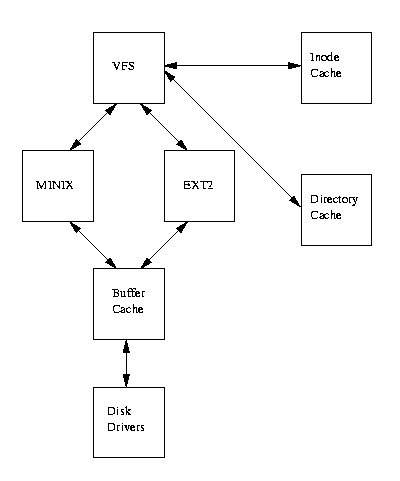
Virtual File System VFS allows Linux to support many, often very different, file systems, each presenting a common software interface to the VFS.
Block Devices
All file system use an Unix block device.
All kinds of disks (IDE, floppy, SCSI, etc) are mapped into a block device.
A block device model any disk as a linear array of characters with a pointer that can be randomly moved to allow any block of characters to be read.
The Second Extended File system (EXT2)
EXT2 defines the file system topology by describing each file in the system with an inode data structure, it is the most used system in Linux.
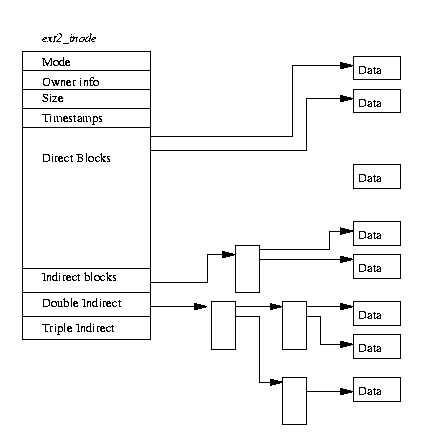
inodes An inode describes which blocks the data within a file occupies as well as the access rights of the file, the file's modification times and the type of the file.
Every file in the EXT2 file system is described by a single inode and each inode has a single unique number identifying it.
The inodes for the file system are all kept together in inode tables.
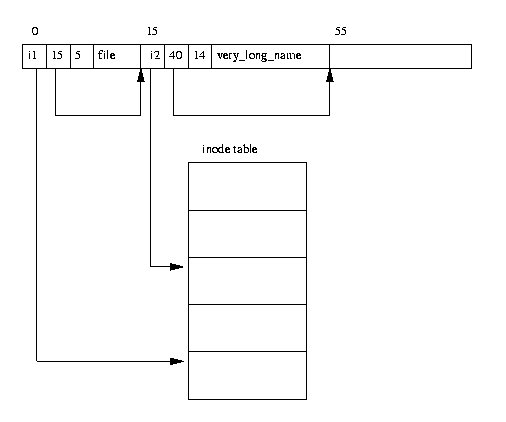
Directories EXT2 directories are simply special files (themselves described by inodes) which contain pointers to the inodes of their directory entries.
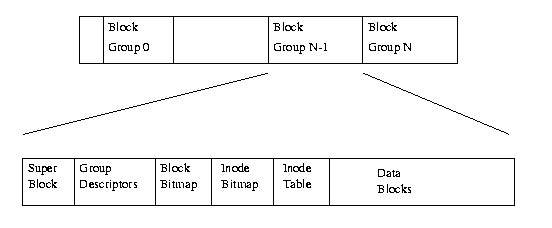
Blocks The EXT2 file system divides the logical partition that it occupies into Block Groups:
Block devices are just a series of blocks that can be read and written. Each group duplicates information critical to the integrity of the file system as well as holding real files and directories as blocks of information and data. This duplication is necessary for file system recovering.
The EXT2 Inode
In the EXT2 file system, the inode is the basic building block; every file and directory in the file system is described by one and only one inode. The EXT2 inodes for each Block Group are kept in the inode table together with a bitmap that allows the system to keep track of allocated and unallocated inodes. It contains the following fields:
mode This holds two pieces of information; what this inode describes and the permissions that users have to it. For EXT2, an inode can describe one of file, directory, symbolic link, block device, character device or FIFO.
Owner Information The user and group identifiers of the owners of this file or directory.
Size The size of the file in bytes,
Timestamps The time that the inode was created and the last time that it was modified,
Datablocks Pointers to the blocks that contain the data that this inode is describing. The first twelve are pointers to the physical blocks containing the data described by this inode and the last three pointers contain more and more levels of indirection.
The EXT2 Superblock The Superblock contains a description of the basic size and shape of this file system. The information within it allows the file system manager to use and maintain the file system. Usually only the Superblock in Block Group 0 is read when the file system is mounted but each Block Group contains a duplicate copy in case of file system corruption.
Magic Number This allows the mounting software to check that this is indeed the Superblock for an EXT2 file system. For the current version of EXT2 this is 0xEF53.
Revision Level The major and minor revision levels allow the mounting code to determine whether or not this file system supports features that are only available in particular revisions of the file system.
Mount Count and Maximum Mount Count Together these allow the system to determine if the file system should be fully checked.
Block Group Number The Block Group number that holds this copy of the Superblock,
Block Size The size of the block for this file system in bytes, for example 1024 bytes,
Blocks per Group The number of blocks in a group. Like the block size this is fixed when the file system is created,
Free Blocks The number of free blocks in the file system,
Free Inodes The number of free Inodes in the file system,
First Inode This is the inode number of the first inode in the file system. The first inode in an EXT2 root file system would be the directory entry for the '/' directory.
The EXT2 Group Descriptor Each Block Group has a data structure describing it. Like the Superblock, all the group descriptors for all of the Block Groups are duplicated in each Block Group in case of file system corruption.
Blocks Bitmap The block number of the block allocation bitmap for this Block Group.
Inode Bitmap The block number of the inode allocation bitmap for this Block Group.
Inode Table The block number of the starting block for the inode table for this Block Group. Each inode is represented by the EXT2 inode data structure described below.
Free blocks count, Free Inodes count, Used directory count The group descriptors are placed on after another and together they make the group descriptor table. Each Blocks Group contains the entire table of group descriptors after its copy of the Superblock. Only the first copy (in Block Group 0) is actually used by the EXT2 file system. The other copies are there, like the copies of the Superblock, in case the main copy is corrupted.
EXT2 Directories
In the EXT2 file system, directories are special files that are used to create and hold access paths to the files in the file system. A directory file is a list of directory entries, each one containing the following information:
inode The inode for this directory entry. This is an index into the array of inodes held in the Inode Table of the Block Group.
name length The length of this directory entry in bytes,
name The name of this directory entry.
The Virtual File System (VFS)
The VFS maintains data structures that describe the whole (virtual) file system and the real, mounted, file systems. The VFS describes the system's files in terms of superblocks and inodes in much the same way as the EXT2 file system uses superblocks and inodes.
The VFS inodes describe files and directories within the system; the contents and topology of the Virtual File System.
As each file system is initialised, it registers itself with the VFS.
This happens as the operating system initialises itself at system boot time
The real file systems are either built into the kernel itself or are built as loadable modules.
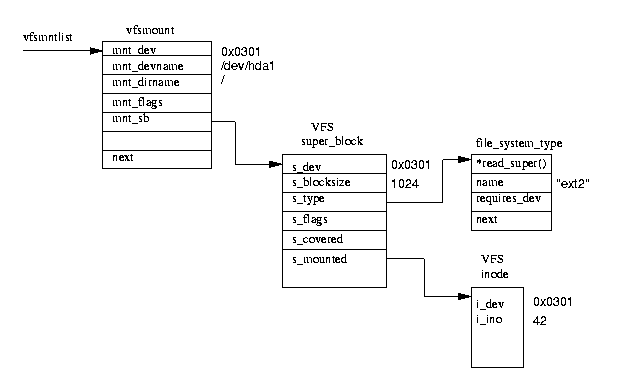
When a block device based file system is mounted, and this includes the root file system, the VFS must read its superblock. Each file system type's superblock read routine must work out the file system's topology and map that information onto a VFS superblock data structure. The VFS keeps a list of the mounted file systems in the system together with their VFS superblocks. Each VFS superblock contains information and pointers to routines that perform particular functions.
The superblock representing a mounted EXT2 file system contains a pointer to the EXT2 specific inode reading routine.
This EXT2 inode read routine, like all of the file system specific inode read routines, fills out the fields in a VFS inode.
Each VFS superblock contains a pointer to the first VFS inode on the file system. For the root file system, this is the inode that represents the ``/'' directory.
This mapping of information is very efficient for the EXT2 file system but moderately less so for other file systems.
As the system's processes access directories and files, system routines are called that traverse the VFS inodes in the system.
The VFS Inode Like the EXT2 file system, every file, directory and so on in the VFS is represented by one and only one VFS inode. The information in each VFS inode is built from information in the underlying file system by file system specific routines. VFS inodes exist only in the kernel's memory and are kept in the VFS inode cache as long as they are useful to the system.
Mounting a File System Consider the following mount command:
$ mount -t iso9660 -o ro /dev/cdrom /mnt/cdrom
This mount command will pass the kernel three pieces of information; the name of the file system, the physical block device that contains the file system and, thirdly, where in the existing file system topology the new file system is to be mounted.
The /proc File System
The /proc file system really shows the power of the Virtual File System. It does not really exist, neither the /proc directory nor its subdirectories and its files actually exist:
The /proc file system, like a real file system, registers itself with the Virtual File System.
When the VFS makes calls to it requesting inodes as its files and directories are opened, the /proc file system creates those files and directories from information within the kernel.
| |  | |
| 5. Pipes |  | Chapter 3. Threads |