| 3. Processes | ||
|---|---|---|
 | Chapter 2. Unix |  |
| 3. Processes | ||
|---|---|---|
| | Chapter 2. Unix | |
Processes
Definition:
Processes carry out tasks within the operating system. A program is a set of machine code instructions and data stored in an executable image on disk and is a passive entity; a process can be thought of as a computer program in action.
Identifiers
Every process in the system has a process identifier. It is simply a number. Each process also has User and group identifiers, these are used to control this processes access to the files and devices in the system.
State
Running The process is either running (it is the current process in the system) or it is ready to run (it is waiting to be assigned to one of the system's CPUs).
Waiting The process is waiting for an event or for a resource. Linux differentiates between two types of waiting process; interruptible and uninterruptible. Interruptible waiting processes can be interrupted by signals whereas uninterruptible waiting processes are waiting directly on hardware conditions and cannot be interrupted under any circumstances.
Stopped The process has been stopped, usually by receiving a signal. A process that is being debugged can be in a stopped state.
Zombie This is a halted process which, for some reason, still has a data structure representing it. It is what it sounds like, a dead process.
Scheduling
Processes are always making system calls and so may often need to wait. Even so, if a process executes until it waits then it still might use a disproportionate amount of CPU time and so Linux uses preemptive scheduling:
time-slice
In this scheme, each process is allowed to run for a small amount of time, 200ms, and, when this time has expired another process is selected to run and the original process is made to wait for a little while until it can run again.
Each time the scheduler is run it does the following:
kernel work The scheduler runs the bottom half handlers and processes the scheduler task queue.
Current process The current process must be processed before another process can be selected to run.
Process selection The scheduler looks through the processes on the run queue looking for the most deserving process to run. If there are any real time processes (those with a real time scheduling policy) then those will get a higher weighting than ordinary processes.
Round Robin If several processes have the same priority, the one nearest the front of the run queue is chosen. The current process will get put onto the back of the run queue. In a balanced system with many processes of the same priority, each one will run in turn.
Swap processes If the most deserving process to run is not the current process, then the current process must be suspended and the new one made to run.
Files
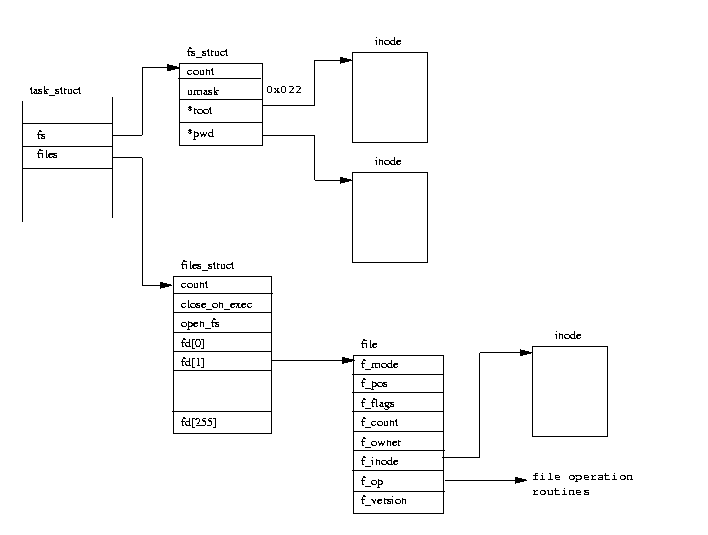
fs_struct contains pointers to this process's VFS inodes and its umask. The umask is the default mode that new files will be created in, and it can be changed via system calls.
files_struct contains information about all of the files that this process is currently using.
Virtual Memory
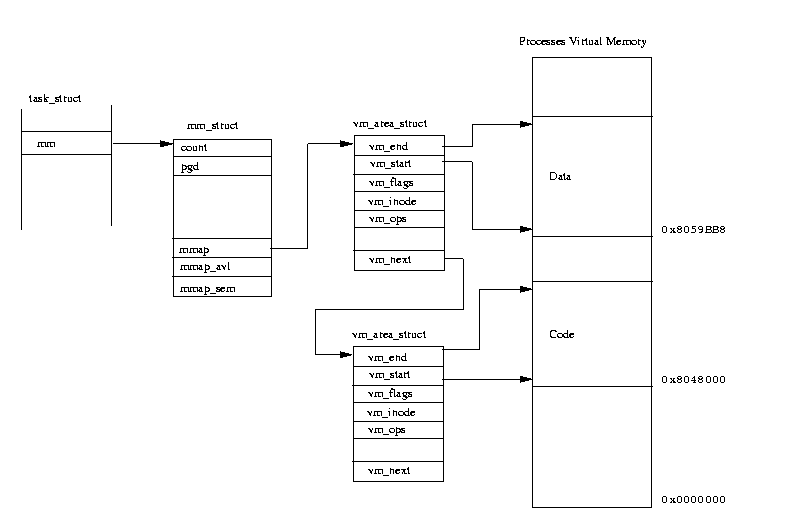
A process's virtual memory contains executable code and data from many sources:
The program image that is loaded; for example a command like ls. This command is composed of both executable code and data.
Allocated (virtual) memory to use during their processing. This newly allocated, virtual, memory needs to be linked into the process's existing virtual memory so that it can be used.
Libraries of commonly useful code. The code and the data from shared libraries must be linked into the process's virtual address space and also into the virtual address space of the other processes sharing it.
Creating a Process
When the system starts up it is running in kernel mode and there is, in a sense, only one process, the initial process (Idle). Like all processes, the initial process has a machine state represented by stacks, registers and so on.
init kernel thread At the end of system initialization, the initial process starts up a kernel thread (called init) and then sits in an idle loop doing nothing. The init kernel thread or process has a process identifier of 1 as it is the system's first real process. It does some initial setting up of the system (such as opening the system console and mounting the root file system) and then executes the system initialization program. This is one of /etc/init, /bin/init or /sbin/init depending on your system. The init program uses /etc/inittab as a script file to create new processes within the system. New processes are created by cloning old processes, or rather by cloning the current process. A new task is created by a system call (fork or clone) and the cloning happens within the kernel in kernel mode. At the end of the system call there is a new process waiting to run once the scheduler chooses it.
Exec call After a process has been cloned a call to the system call exec will replace its current code image for a new one, from a different executable, and the process can begin to run a new application.
Links
Every process in the system, except the initial process has a parent process. New processes are not created, they are copied, or rather cloned from previous processes.
init(1)-+-crond(98) |-emacs(387) |-gpm(146) |-inetd(110) |-kerneld(18) |-kflushd(2) |-klogd(87) |-kswapd(3) |-login(160)---bash(192)---emacs(225) |-lpd(121) |-mingetty(161) |-mingetty(162) |-mingetty(163) |-mingetty(164) |-login(403)---bash(404)---pstree(594) |-sendmail(134) |-syslogd(78) `-update(166)
| |  | |
| 2. Memory Management |  | 4. Signals |