| 2. Memory Management | ||
|---|---|---|
 | Chapter 2. Unix |  |
| 2. Memory Management | ||
|---|---|---|
| | Chapter 2. Unix | |
Memory Management
The memory management subsystem is one of the most important parts of the operating system. It allows:
Large Address Spaces The virtual memory can be many times larger than the physical memory in the system, Protection Each process in the system has its own virtual address space completely separate from each other and so a process running one application cannot affect another. Memory Mapping Memory mapping is used to map image and data files into a processes address space. Fair Physical Memory Allocation The memory management subsystem allows each running process in the system a fair share of the physical memory of the system, Shared Virtual Memory There are times when processes share memory: when there are several processes in the system running the same program code.
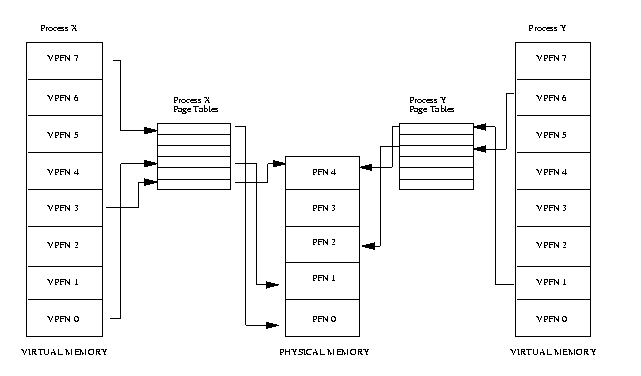
An Abstract Model of Virtual Memory
A virtual address is composed of two parts:
an offset
a virtual page frame number.
Pages: virtual and physical memory are divided into handy sized chunks called pages. Each of these pages is given a unique number; the page frame number (PFN).
If the page size is 4 Kbytes, bits 11:0 of the virtual address contain the offset and bits 12 and above are the virtual page frame number:
<--------- Page Frame Number -------->|<------ Offset ------>
|_|_|_|_|_|_|_|_|_|_|_|_|_|_|_|_|_|_|_|_|_|_|_|_|_|_|_|_|_|_|_|
32 BITS Address Word
Each entry in the page table contains the following information:
Valid flag: this indicates if this page table entry is valid,
The physical page frame number: that this entry is describing,
Access control information: this describes how the page may be used. Can it be written to? Does it contain executable code?
Page Fault:
The way the processor notifies the operating system that the correct process has attempted to access a virtual address for which there is no valid translation is specific to the processor.
Dealing with Page Faults
Invalid virtual address: It means that the process has attempted to access a virtual address that it should not have.
The application has gone wrong in some way.
In this case the operating system will terminate it.
Valid virtual address: It means that the page that it refers to is not currently in memory.
The operating system must bring the appropriate page into memory from the image on disk.
Swapping
Happens when the operating system needs to create new pages in the physical memory and there is no space. It will discard old pages in to create space:
Clean Pages If the page to be discarded came from an image or data file and has not been written to then the page does not need to be saved. It is just discarded.
Dirty Pages If the page has been modified, its contents must preserve and it is saved in a special sort of file called the swap file.
Thrashing : If the algorithm used to decide which pages to discard or swap is not efficient then a condition known as thrashing occurs. In this case, pages are constantly being written to disk and then being read back and the operating system is too busy to allow much real work to be performed.
Least Recently Used (LRU) This scheme involves every page in the system having an age which changes as the page is accessed. The more that a page is accessed, the younger it is; the less that it is accessed the older and more stale it becomes. Old pages are good candidates for swapping.
Physical Addressing Mode
It does not make much sense for the operating system itself to run in virtual memory.
Physical addressing mode requires no page tables and the processor does not attempt to perform any address translations in this mode. The kernel is linked to run in physical address space.
Caches
Buffer Cache These buffers are of fixed sizes (for example 512 bytes) and contain blocks of information that have either been read from a block device or are being written to it.
Page Cache It is used to cache the logical contents of a file a page at a time and is accessed via the file and offset within the file. As pages are read into memory from disk, they are cached in the page cache.
Swap Cache So long as pages are not modified after they have been written to the swap file then the next time the page is swapped out there is no need to write it to the swap.
Hardware Caches Example: cache of Page Table Entries. In this case, the processor does not always read the page table directly but instead caches translations for pages as it needs them.
Memory Mapping
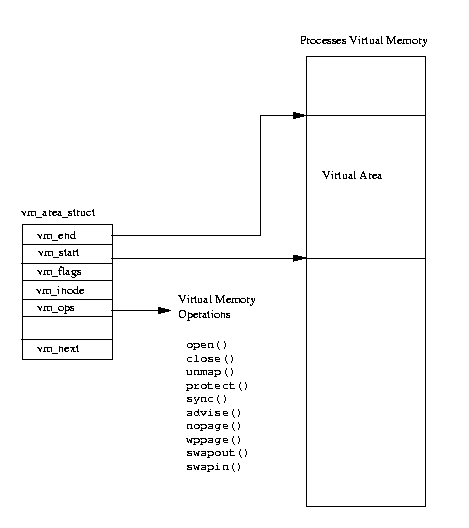
When an image is executed, the contents of the executable image must be brought into the processes virtual address space.
Implementation: The executable file is not actually brought into physical memory, instead it is merely linked into the processes virtual memory. Then, as the parts of the program are referenced by the running application, the image is brought into memory from the executable image.
Swapping Out and Discarding Pages
When physical memory becomes scarce the Linux memory management subsystem must attempt to free physical pages. This task falls to the kernel swap daemon (kswapd). The kernel swap daemon is a special type of process, a kernel thread. Kernel threads are processes have no virtual memory, instead they run in kernel mode in the physical address space.
It swap pages out to the system's swap files.
It makes sure that there are enough free pages in the system to keep the memory management system operating efficiently.
| |  | |
| 1. Goals |  | 3. Processes |